何故かブラウザからの再起動だと駄目。acアダプタ抜き差しする必要がある。
2017年12月25日月曜日

2017年12月19日火曜日
【ESXi】【NUC】【PX-W3U4】仮想マシンでTVチューナー使用【失敗】
◆環境
・VM:ESXi6.5(従って試聴はリモートデスクトップ経由となる)
・ゲストOS:Windows10x64
◆前提条件
・ESXiがインストール済みであること。
・ゲストOSとしてwindows10がインストール済みであること。
◆その他
多分、USB3.0コントローラーとPX-W3U4の相性が悪く不定期にブルースクリーンになる。Windows10のUSBコントローラードライバーも関係あるかも。Windows7+Intel公式ドライバーでも、駄目だった。NUC+PX-W3U4の組み合わせは駄目そう。
◆機材
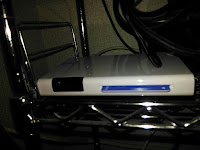
・PX-W3U4
・B-CASカード(別売り)
◆使用ツール
・tvtest0.7.23 x86版
・tvrock09t8a
◆参考サイト
https://sites.google.com/site/tsnukituner/tstunerlist/plex/px-w3u4
◆インストール手順
1. ESXiパススルー設定
下記のリンクを参照。
【ESXi】【NUC】ESXi6.5 USB3(PCIPassThrough)
2. ドライバーインストール
2.1. 公式からドライバーダウンロード
1) OSがWindows10x64のため、ドライバーもx64版をダウンロード。
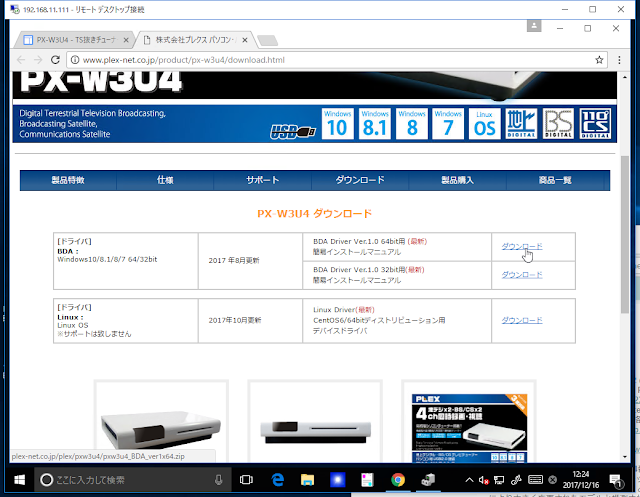
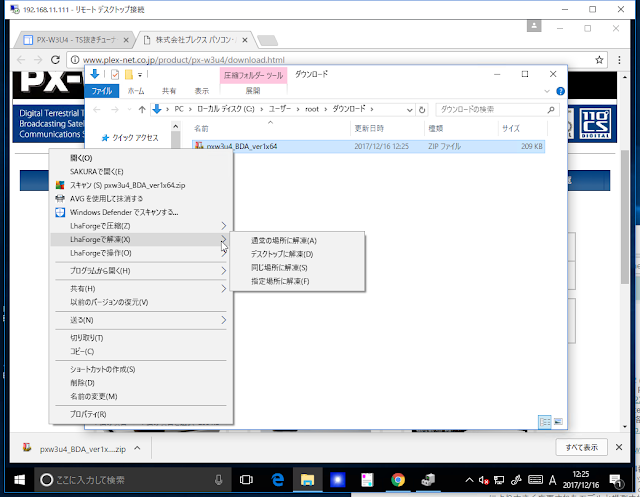
2) ダウンロードしたファイルを解凍。(下記は、LhaForgeを使用しているが、Windows標準の解凍でOK)
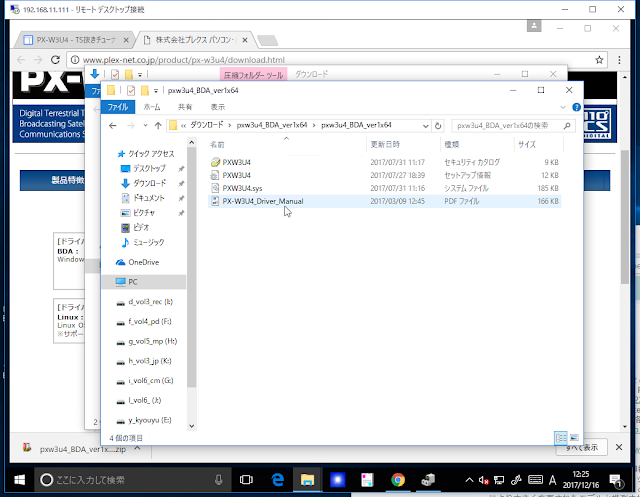
3) 解凍したファイル。(後で使用)
2.2. ドライバインストール
1) Winキー+X、Mの順に押下(Win10の場合)し、デバイスマネージャー起動。
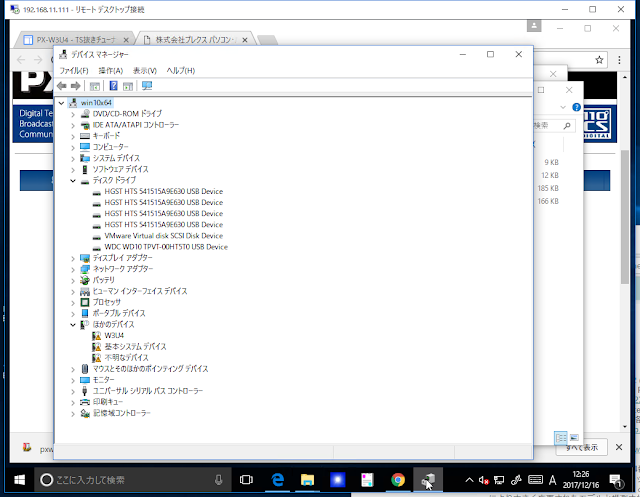
2) 「W3U4」を選択し、右クリックし、「ドライバーソフトウェア」の更新を選択。
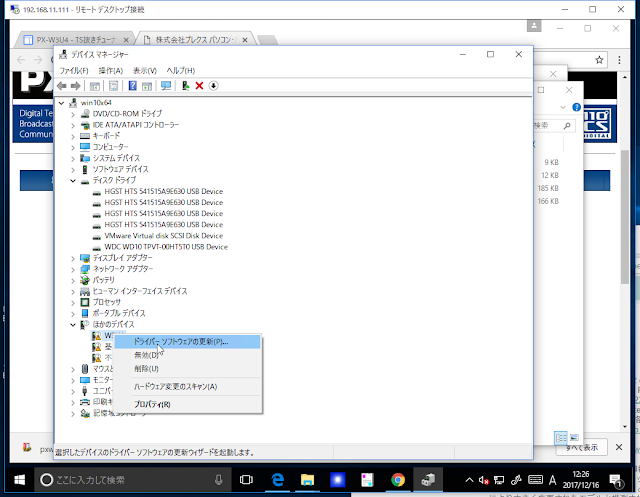
3) 「コンピューターを参照してドライバーソフトウェアを検索します」を選択。
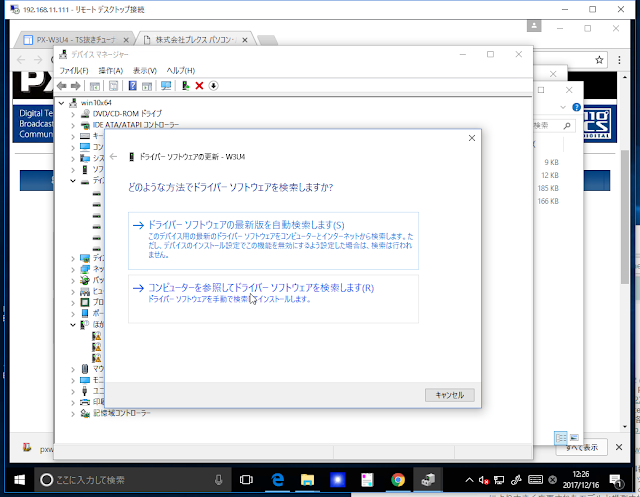
4) 手順2.1.で解凍したフォルダを指定
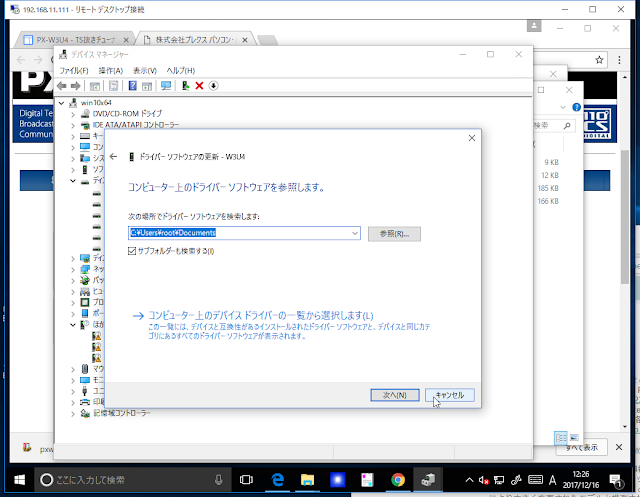
5) しばらく待つ。
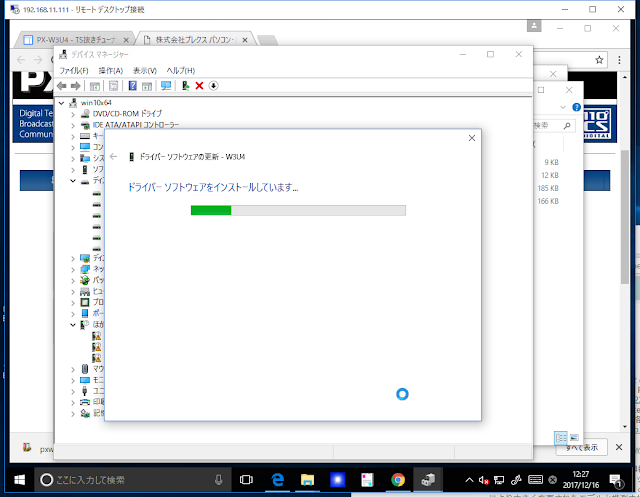
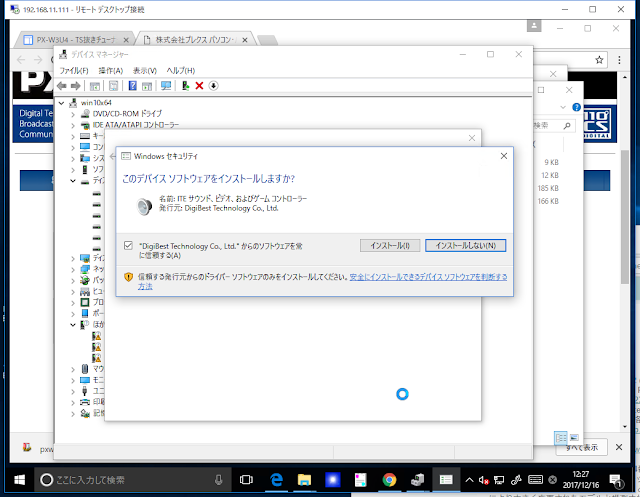
6) "~を常に信頼する"チェックボックスをチェックして、「インストール」ボタン押下。
7) 「閉じる」ボタン押下。
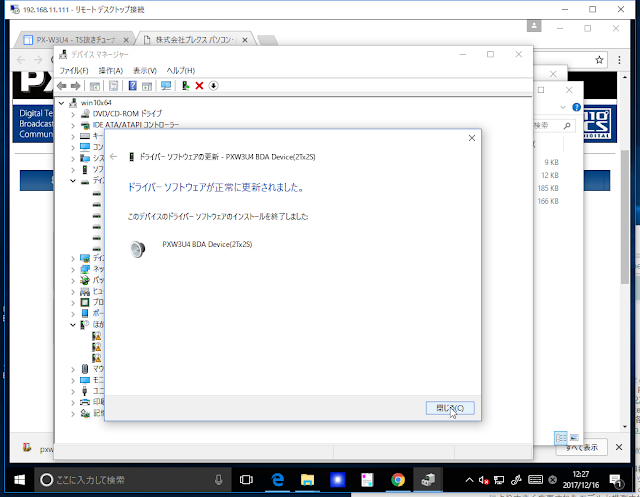
※何故かVisual C++ 20XX 再頒布可能パッケージはインストールしなくても動作した。他のソフトのインストールの際にインストール済みだったのかな?動作しない場合は、適宜インストールすること。
3. フィルタインストール
3.1. ダウンロード
フィルタダウンロード
3.2. ダウンロードしたファイルの解凍(下記は解凍後)
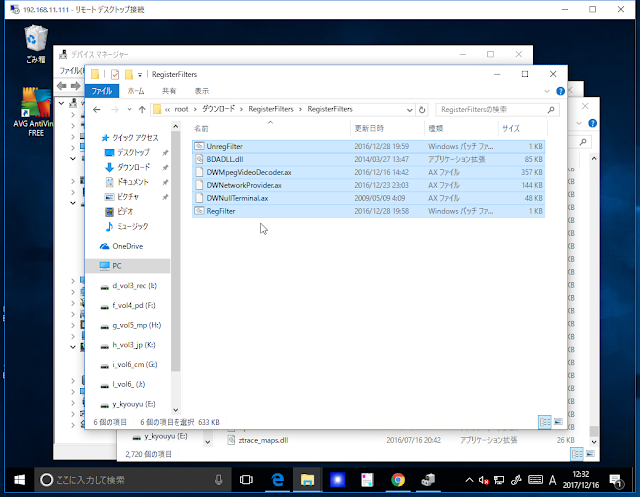
3.2. フィルタインストール
1) Winキー押下、【cmd】を入力し、「コマンドプロンプト」を右クリックし、「管理者として実行」を選択。
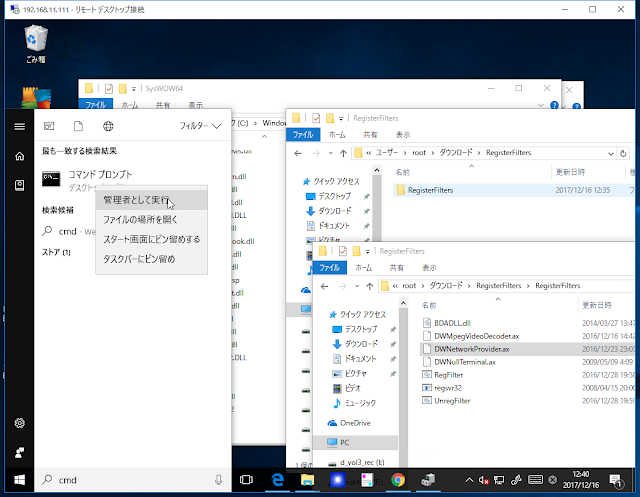
2) 「はい」を押下。
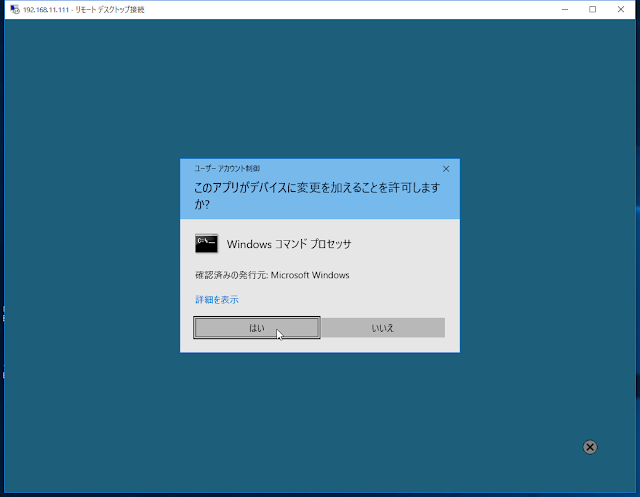
3) cdコマンドでフィルタのディレクトリへ移動。(パスは適宜読み替えること。)
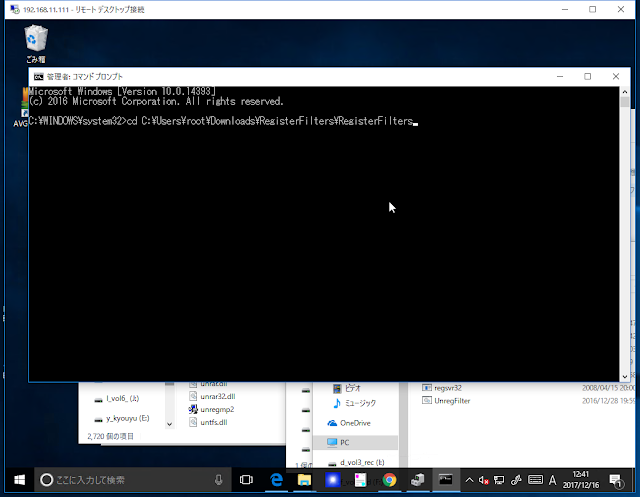
4) 「RegFilter.bat」を入力し、Enterキー押下。(下記は実行後のポップアップウィンドウが表示されている。OK⇒ポップアップ⇒OK⇒・・・。)
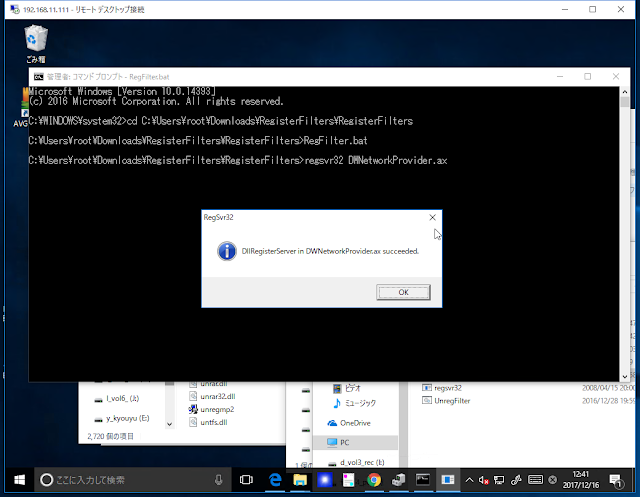
3. tvtestインストール
3.1. 32bit版をダウンロード&解凍
ローカルにあったので、それを使用。googleで検索すれば、出てくるはず。
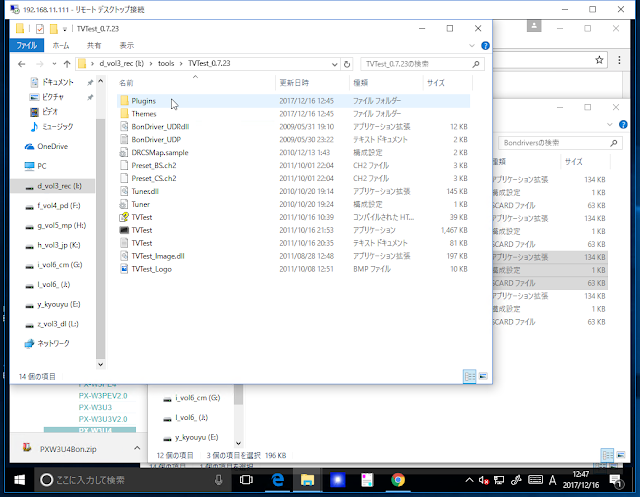
3.2. BonDriverダウンロード&解凍
下記からダウンロード
BonDriver

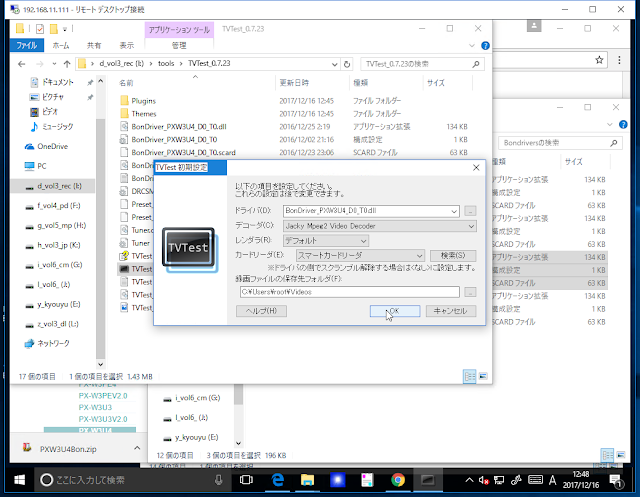
3.4. TvTest起動し、下記のように入力。
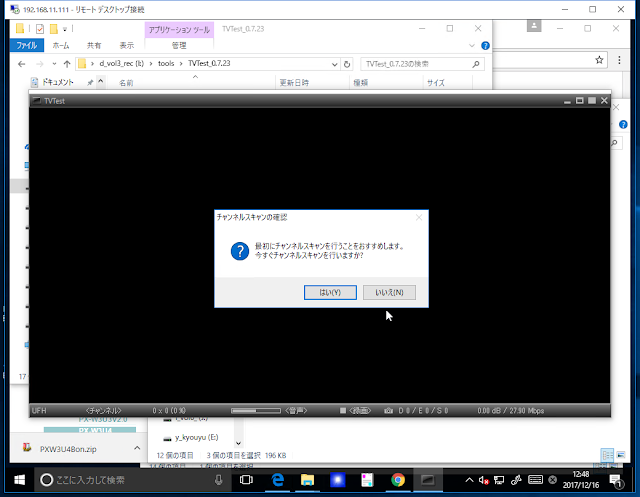
3.4. チャネルスキャン実行
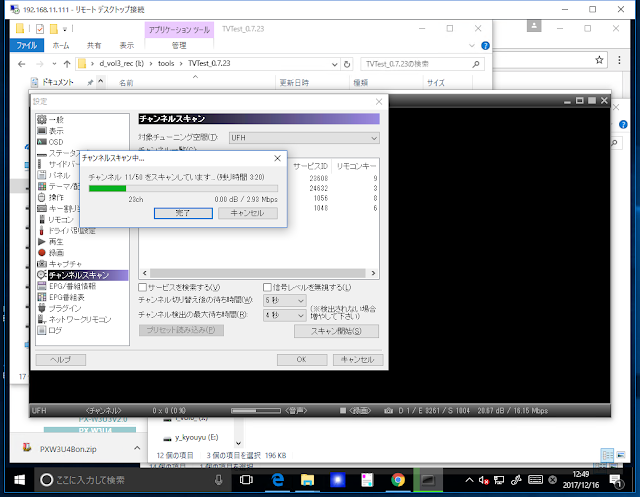
3.5. しばらく待つと、視聴が始まる。
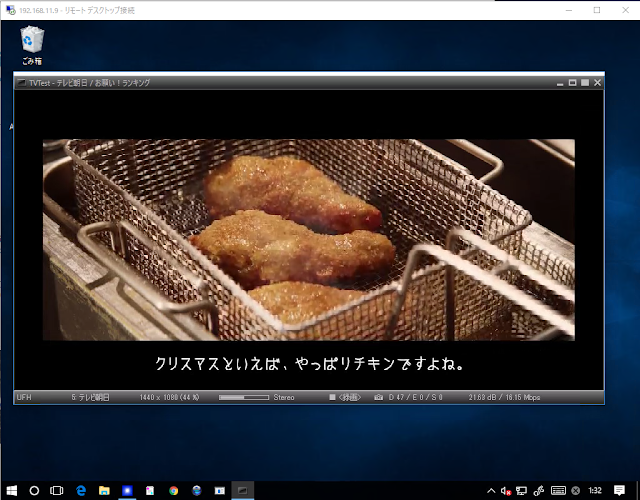
-------------------以下、今後記載予定-------------------
4.tvrock
4.1. ダウンロード
4.2. tvtest連携ファイル配置
連携ファイル x32版を使用(マニュアルに記載有り。)
4.2. dtune.bat実行
4.3. 設定
◆USBについて
USB2.0接続になる。試聴しないので特に問題無し。
◆視聴画質調査予定
リモートデスクトップ接続のためか、コーデックのせいなのかコーミングノイズが発生する。tvtestの設定で修正できるかな?
◆録画画質調査予定
・VM:ESXi6.5(従って試聴はリモートデスクトップ経由となる)
・ゲストOS:Windows10x64
◆前提条件
・ESXiがインストール済みであること。
・ゲストOSとしてwindows10がインストール済みであること。
◆その他
多分、USB3.0コントローラーとPX-W3U4の相性が悪く不定期にブルースクリーンになる。Windows10のUSBコントローラードライバーも関係あるかも。Windows7+Intel公式ドライバーでも、駄目だった。NUC+PX-W3U4の組み合わせは駄目そう。
・PX-W3U4
・B-CASカード(別売り)

◆使用ツール
・tvtest0.7.23 x86版
・tvrock09t8a
◆参考サイト
https://sites.google.com/site/tsnukituner/tstunerlist/plex/px-w3u4
◆インストール手順
1. ESXiパススルー設定
下記のリンクを参照。
【ESXi】【NUC】ESXi6.5 USB3(PCIPassThrough)
2. ドライバーインストール
2.1. 公式からドライバーダウンロード
1) OSがWindows10x64のため、ドライバーもx64版をダウンロード。

2) ダウンロードしたファイルを解凍。(下記は、LhaForgeを使用しているが、Windows標準の解凍でOK)

3) 解凍したファイル。(後で使用)

2.2. ドライバインストール
1) Winキー+X、Mの順に押下(Win10の場合)し、デバイスマネージャー起動。

2) 「W3U4」を選択し、右クリックし、「ドライバーソフトウェア」の更新を選択。

3) 「コンピューターを参照してドライバーソフトウェアを検索します」を選択。

4) 手順2.1.で解凍したフォルダを指定

5) しばらく待つ。

6) "~を常に信頼する"チェックボックスをチェックして、「インストール」ボタン押下。

7) 「閉じる」ボタン押下。

※何故かVisual C++ 20XX 再頒布可能パッケージはインストールしなくても動作した。他のソフトのインストールの際にインストール済みだったのかな?動作しない場合は、適宜インストールすること。
3. フィルタインストール
3.1. ダウンロード
フィルタダウンロード
3.2. ダウンロードしたファイルの解凍(下記は解凍後)

3.2. フィルタインストール
1) Winキー押下、【cmd】を入力し、「コマンドプロンプト」を右クリックし、「管理者として実行」を選択。

2) 「はい」を押下。

3) cdコマンドでフィルタのディレクトリへ移動。(パスは適宜読み替えること。)

4) 「RegFilter.bat」を入力し、Enterキー押下。(下記は実行後のポップアップウィンドウが表示されている。OK⇒ポップアップ⇒OK⇒・・・。)

3. tvtestインストール
3.1. 32bit版をダウンロード&解凍
ローカルにあったので、それを使用。googleで検索すれば、出てくるはず。

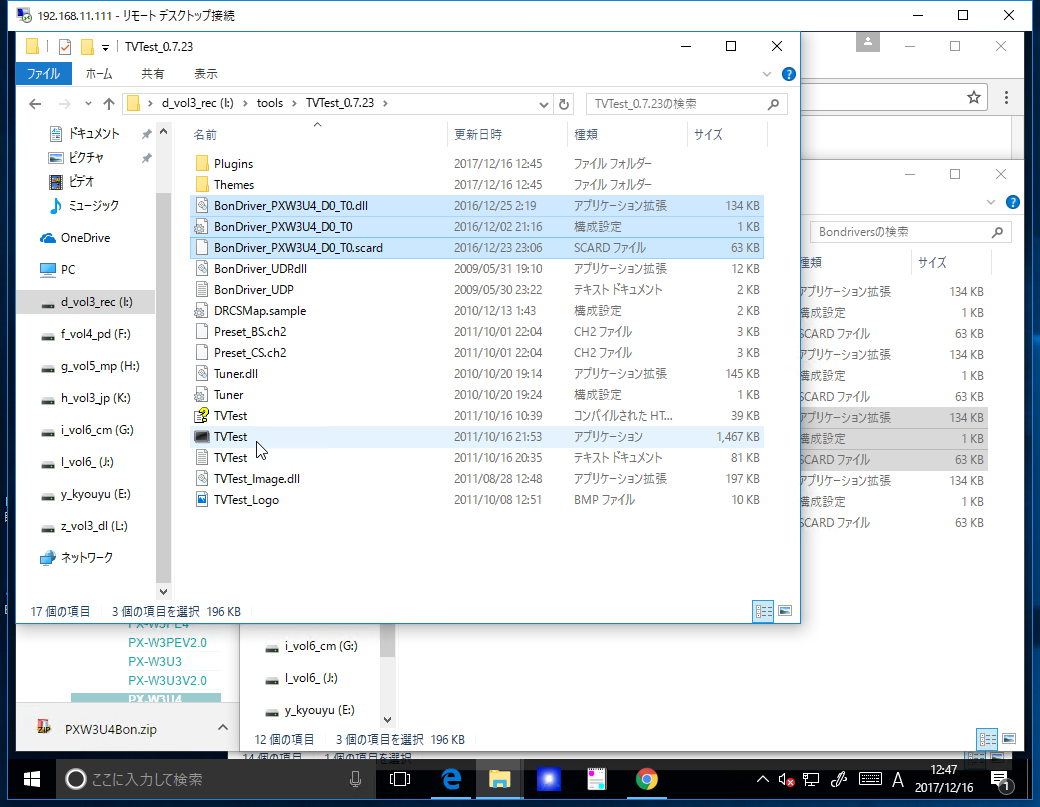
3.2. BonDriverダウンロード&解凍
下記からダウンロード
BonDriver
3.3. TvTestの直下にBonDriverをコピー(下記はT0のみだが、Wチューナー使用する場合はT1もコピー、また、BSの場合も同様。)
3.4. TvTest起動し、下記のように入力。

3.4. チャネルスキャン実行


3.5. しばらく待つと、視聴が始まる。

-------------------以下、今後記載予定-------------------
4.tvrock
4.1. ダウンロード
4.2. tvtest連携ファイル配置
連携ファイル x32版を使用(マニュアルに記載有り。)
4.2. dtune.bat実行
4.3. 設定
◆USBについて
USB2.0接続になる。試聴しないので特に問題無し。
◆視聴画質調査予定
リモートデスクトップ接続のためか、コーデックのせいなのかコーミングノイズが発生する。tvtestの設定で修正できるかな?
◆録画画質調査予定
2017年10月25日水曜日
【Java】try with resourcesのカバレッジ
◆EclEmmaでどうしても通せないルートがある。
各サイトが説明しているようにカバレッジに拘る必要はないのだが、
テスト漏れを即検出したいので、できれば100%にしたい。
しかし、下記のようにtry-with-resources 文など一部のコードがEclEmmaで全ルートパスできない。

ツールチップを表示すると7ルートミス。

Jmockit(下記コード参照)で1まで行くのだが、あと1ルートがパスできない。

◆テスト対象
◆テストコード
◆Maven(pom.xml)
◆環境
各サイトが説明しているようにカバレッジに拘る必要はないのだが、
テスト漏れを即検出したいので、できれば100%にしたい。
しかし、下記のようにtry-with-resources 文など一部のコードがEclEmmaで全ルートパスできない。

ツールチップを表示すると7ルートミス。

Jmockit(下記コード参照)で1まで行くのだが、あと1ルートがパスできない。

◆テスト対象
package sampl.junitsample;

import java.io.IOException;
import java.io.OutputStream;
import java.net.HttpURLConnection;
import java.net.URL;

public class App {
 public static void main(String[] args) throws IOException {
  HttpURLConnection conn = (HttpURLConnection) new URL("http://localhost").openConnection();
  conn.setDoOutput(true);

  try (OutputStream st = conn.getOutputStream()) {
   st.write("abc".getBytes());
  }
 }
}
◆テストコード
package sampl.junitsample;

import java.io.ByteArrayOutputStream;
import java.io.IOException;
import java.io.OutputStream;

import org.junit.Test;

import mockit.Mock;
import mockit.MockUp;

public class AppTest {
 @Test
 public void testApp1() throws IOException {
  App.main(null);
 }

 @Test
 public void testApp2() throws IOException {
  new MockUp<sun.net.www.protocol.http.HttpURLConnection>() { // 何故かsun.~
   @Mock
   public OutputStream getOutputStream() throws IOException {
    throw new IOException("mock exception.");
   }
  };
  try {
   App.main(null);
  } catch (Exception e) {
   e.printStackTrace();
  }
 }

 @Test
 public void testApp3() throws IOException {
  new MockUp<java.io.ByteArrayOutputStream>() { // デバッガで実際の型を調べるとPosterOutputStream
   @Mock
   public void write(byte[] b) throws IOException {
    throw new IOException("mock exception.");
   }
  };
  try {
   App.main(null);
  } catch (Exception e) {
   e.printStackTrace();
  }
 }

 @Test
 public void testApp5() throws IOException {
  new MockUp<ByteArrayOutputStream>() { // デバッガで実際の型を調べるとPosterOutputStream
   @Mock
   public void write(byte[] b) throws IOException {
    throw new IOException("mock exception.");
   }

   @Mock
   public void close() throws IOException {
    throw new IOException("mock exception.");
   }
  };

  try {
   App.main(null);
  } catch (Exception e) {
   e.printStackTrace();
  }
 }

 @Test
 public void testApp6() throws IOException {
  new MockUp<sun.net.www.protocol.http.HttpURLConnection>() { // 何故かsun.~
   @Mock
   public OutputStream getOutputStream() throws IOException {
    return null;
   }
  };
  new MockUp<ByteArrayOutputStream>() {
   @Mock
   public void write(byte[] b) throws IOException {
    return;
   }

   @Mock
   public void close() throws IOException {
    throw new IOException("mock exception.");
   }
  };

  try {
   App.main(null);
  } catch (Exception e) {
   e.printStackTrace();
  }
 }
}
<project xmlns="http://maven.apache.org/POM/4.0.0" xmlns:xsi="http://www.w3.org/2001/XMLSchema-instance"
 xsi:schemaLocation="http://maven.apache.org/POM/4.0.0 http://maven.apache.org/xsd/maven-4.0.0.xsd">
 <modelVersion>4.0.0</modelVersion>

 <groupId>sampl</groupId>
 <artifactId>junitsample</artifactId>
 <version>0.0.1-SNAPSHOT</version>
 <packaging>jar</packaging>

 <name>junitsample</name>
 <url>http://maven.apache.org</url>

 <properties>
  <project.build.sourceEncoding>UTF-8</project.build.sourceEncoding>
 </properties>

 <dependencies>
  <!-- https://mvnrepository.com/artifact/junit/junit -->
  <dependency>
   <groupId>junit</groupId>
   <artifactId>junit</artifactId>
   <version>4.4</version>
   <scope>test</scope>
  </dependency>
  <!-- https://mvnrepository.com/artifact/org.jmockit/jmockit -->
  <dependency>
   <groupId>org.jmockit</groupId>
   <artifactId>jmockit</artifactId>
   <version>1.35</version>
   <scope>test</scope>
  </dependency>
 </dependencies>

</project>
- Eclipse:4.7(pleiades)
- EclEmma:3.0.0.201706140232
2017年8月21日月曜日
【Java】File Downloadその3(commons-io)
String str = IOUtils.toString(new URL(targetUrl), Charset.defaultCharset());
FileUtils.writeStringToFile(new File(filePath), str, Charset.defaultCharset());
ファイル保存される。ちょっとしたものは上記で良いが、apache httpclientを推奨。apache httpclientはアクセス先がページ移動(301)したとき等に自動で移動してくれる。
◆ソースコード
package sample.httpget;

import java.io.File;
import java.io.IOException;
import java.net.URL;
import java.nio.charset.Charset;

import org.apache.commons.io.FileUtils;
import org.apache.commons.io.IOUtils;

public class App {
  public static void main(String[] args) {
    try {
      download("http://google.com/", "/tmp/google.htm", Charset.forName("Shift_JIS"));
    } catch (IOException e) {
      e.printStackTrace();
    }
  }

  public static void download(String targetUrl, String filePath, Charset ch) throws IOException {
    String str = IOUtils.toString(new URL(targetUrl), ch);
    FileUtils.writeStringToFile(new File(filePath), str, Charset.defaultCharset());
  }
}
◆pom.xml
<project xmlns="http://maven.apache.org/POM/4.0.0" xmlns:xsi="http://www.w3.org/2001/XMLSchema-instance"
 xsi:schemaLocation="http://maven.apache.org/POM/4.0.0 http://maven.apache.org/xsd/maven-4.0.0.xsd">
 <modelVersion>4.0.0</modelVersion>

 <groupId>sample</groupId>
 <artifactId>HttpGet</artifactId>
 <version>0.0.1-SNAPSHOT</version>
 <packaging>jar</packaging>

 <name>HttpGet</name>
 <url>http://maven.apache.org</url>

 <properties>
  <project.build.sourceEncoding>UTF-8</project.build.sourceEncoding>
 </properties>

 <dependencies>
  <dependency>
   <groupId>junit</groupId>
   <artifactId>junit</artifactId>
   <version>3.8.1</version>
   <scope>test</scope>
  </dependency>
  <!-- https://mvnrepository.com/artifact/commons-io/commons-io -->
  <dependency>
   <groupId>commons-io</groupId>
   <artifactId>commons-io</artifactId>
   <version>2.5</version>
  </dependency>

 </dependencies>
</project>
2017年8月20日日曜日
【Java】簡易HTTP Post
■3つ程。3番目はcommons-ioが必要。
◆ソースコード
◆pom.xml
◆ソースコード
package sample.httppost;

import java.io.IOException;
import java.io.InputStream;
import java.io.OutputStream;
import java.net.HttpURLConnection;
import java.net.URL;
import java.net.URLConnection;
import java.nio.charset.Charset;

import org.apache.commons.io.IOUtils;

import javafx.util.Pair;

public class App {
  public static void main(String[] args) {
    try {
      sendPost1("http://localhost:8090/", "abc");
      System.out.println(sendPost2("http://localhost:8090/", "abc"));
      System.out.println(sendPost3("http://localhost:8090/", "abc", Charset.defaultCharset()));
    } catch (IOException e) {
      e.printStackTrace();
    }
  }

  public static void sendPost1(String targetUrl, String sendStr) throws IOException {
    URLConnection conn = new URL(targetUrl).openConnection();
    conn.setDoOutput(true);

    try (OutputStream st = conn.getOutputStream()) {
      st.write(sendStr.getBytes());
    }
  }

  public static int sendPost2(String targetUrl, String sendStr) throws IOException {
    HttpURLConnection conn = (HttpURLConnection) new URL(targetUrl).openConnection();
    conn.setDoOutput(true);

    try (OutputStream st = conn.getOutputStream()) {
      st.write(sendStr.getBytes());
    }
    return conn.getResponseCode();
  }


  public static Pair<Integer,String> sendPost3(String targetUrl, String sendStr, Charset chSet) throws IOException {
    HttpURLConnection conn = (HttpURLConnection) new URL(targetUrl).openConnection();
    conn.setDoOutput(true);
    conn.setRequestProperty("Accept-Charset", chSet.name());
    conn.setRequestProperty("Content-Type", "application/x-www-form-urlencoded;charset=" + chSet.name());
    conn.setRequestProperty("User-Agent", "Mozilla/5.0");

    try (OutputStream st = conn.getOutputStream()) {
      st.write(sendStr.getBytes());
    }

    try (InputStream st = conn.getInputStream()) {
      int code = conn.getResponseCode();
      String str = IOUtils.toString(st, chSet);
      return new Pair<Integer, String>(code, str);
    }
  }
}
◆pom.xml
<project xmlns="http://maven.apache.org/POM/4.0.0" xmlns:xsi="http://www.w3.org/2001/XMLSchema-instance"
 xsi:schemaLocation="http://maven.apache.org/POM/4.0.0 http://maven.apache.org/xsd/maven-4.0.0.xsd">
 <modelVersion>4.0.0</modelVersion>

 <groupId>sample</groupId>
 <artifactId>HttpPost</artifactId>
 <version>0.0.1-SNAPSHOT</version>
 <packaging>jar</packaging>

 <name>HttpPost</name>
 <url>http://maven.apache.org</url>

 <properties>
  <project.build.sourceEncoding>UTF-8</project.build.sourceEncoding>
 </properties>

 <dependencies>
  <dependency>
   <groupId>junit</groupId>
   <artifactId>junit</artifactId>
   <version>3.8.1</version>
   <scope>test</scope>
  </dependency>
  <!-- https://mvnrepository.com/artifact/commons-io/commons-io -->
  <dependency>
   <groupId>commons-io</groupId>
   <artifactId>commons-io</artifactId>
   <version>2.5</version>
  </dependency>
 </dependencies>
</project>
【Java】File Downloadその2(commons-io)
FileUtils.copyURLToFile(new URL("http://google.com/"), new File("/tmp/google.htm"));
1行ですむが文字コードが指定できない。保存したファイルをブラウザで開くとサイトによっては文字化けする。何故だ…
ちょっとしたものは上記で良いが、apache httpclientを推奨。apache httpclientはアクセス先がページ移動(301)したとき等に自動で移動してくれる。
◆ソースコード
package sample.httpget;

import java.io.File;
import java.io.IOException;
import java.net.URL;

import org.apache.commons.io.FileUtils;

public class App {
 public static void main(String[] args) {
  try {
   download("http://google.com/", "/tmp/google.htm");
  } catch (IOException e) {
   e.printStackTrace();
  }
 }

 public static void download(String targetUrl, String filePath) throws IOException {
  FileUtils.copyURLToFile(new URL(targetUrl), new File(filePath)); // 文字コードが設定できないのでサイトによっては文字化けする?
 }
}
◆pom.xml
<project xmlns="http://maven.apache.org/POM/4.0.0" xmlns:xsi="http://www.w3.org/2001/XMLSchema-instance"
 xsi:schemaLocation="http://maven.apache.org/POM/4.0.0 http://maven.apache.org/xsd/maven-4.0.0.xsd">
 <modelVersion>4.0.0</modelVersion>

 <groupId>sample</groupId>
 <artifactId>HttpGet</artifactId>
 <version>0.0.1-SNAPSHOT</version>
 <packaging>jar</packaging>

 <name>HttpGet</name>
 <url>http://maven.apache.org</url>

 <properties>
  <project.build.sourceEncoding>UTF-8</project.build.sourceEncoding>
 </properties>

 <dependencies>
  <dependency>
   <groupId>junit</groupId>
   <artifactId>junit</artifactId>
   <version>3.8.1</version>
   <scope>test</scope>
  </dependency>
  <!-- https://mvnrepository.com/artifact/commons-io/commons-io -->
  <dependency>
   <groupId>commons-io</groupId>
   <artifactId>commons-io</artifactId>
   <version>2.5</version>
  </dependency>

 </dependencies>
</project>
【Java】File Downloadその1(commons-io)
IOUtils.toString(new URL("http://google.com/"), "Shift_JIS");ちょっとしたものは上記で良いが、apache httpclientを推奨。apache httpclientはアクセス先がページ移動(301)したとき等に自動で移動してくれる。
◆ソースコード
package sample.httpget;

import java.io.IOException;
import java.net.URL;

import org.apache.commons.io.IOUtils;

public class App {
  public static void main(String[] args) {
    try {
      System.out.println(download("http://google.com/", "Shift_JIS"));
    } catch (IOException e) {
      e.printStackTrace();
    }
  }

  public static String download(String targetUrl, String ch) throws IOException {
    return IOUtils.toString(new URL(targetUrl), ch);
  }
}
◆pom.xml
<project xmlns="http://maven.apache.org/POM/4.0.0" xmlns:xsi="http://www.w3.org/2001/XMLSchema-instance"
 xsi:schemaLocation="http://maven.apache.org/POM/4.0.0 http://maven.apache.org/xsd/maven-4.0.0.xsd">
 <modelVersion>4.0.0</modelVersion>

 <groupId>sample</groupId>
 <artifactId>HttpGet</artifactId>
 <version>0.0.1-SNAPSHOT</version>
 <packaging>jar</packaging>

 <name>HttpGet</name>
 <url>http://maven.apache.org</url>

 <properties>
  <project.build.sourceEncoding>UTF-8</project.build.sourceEncoding>
 </properties>

 <dependencies>
  <dependency>
   <groupId>junit</groupId>
   <artifactId>junit</artifactId>
   <version>3.8.1</version>
   <scope>test</scope>
  </dependency>
  <!-- https://mvnrepository.com/artifact/commons-io/commons-io -->
  <dependency>
   <groupId>commons-io</groupId>
   <artifactId>commons-io</artifactId>
   <version>2.5</version>
  </dependency>

 </dependencies>
</project>
登録:
投稿 (Atom)